The Mission
My plan was to build a compact Pentium-III-based PC for media arcival purposes, mainly with 3.5 and 5.25-inch floppy diskettes, Iomega Zip disks and optical discs (CDs and DVDs) in mind. But the scope also extended to SCSI-based storage and external devices – like film scanners, for example. Of course it would not hurt to be able to run the occasional era-appropriate game, would it?
Target Operating Systems
- DOS – MS-DOS 6.22, FreeDOS (mainly for diskette archiving tools)
- Windows – Windows 98SE and Windows 2000 Professional (for certain SCSI-related software and archiving CDs/DVDs)
- Unix/Linux – BSD 6/7, SuSE Linux 7/8, slim 32-bit Linuxes (for archiving edge-cases and for experimental purposes)
Specifications
Backbone – CPU, mainboard and graphics
Why a Pentium III? Mainboard floppy disk controllers of this era are old enough to support a wide range of disk types and, well, because I alway wanted one since I had my first Celeron-based PC. A few years ago I acquired a first-gen Pentium III (Katmai) which runs at 550 MHz (with a frontside bus speed of 100 MHz) and with it came an Elitegroup mainboard: the ECS P6BXT-A+ (v1.3) which was built around the well received Intel BX440 chipset and it features both, slot 1 (SECC2) for Pentium II and III processors as well as socket 370 (PGA370) for Celerons. The Nvidia GeForce FX 5200 was newer than the motherboard by a few years and would have been a decent upgrade in this computer's life.
Storage – SD cards, diskette drives and more
SD storage was supposed to make multiple OS setups a breeze: as changing the operating system would be as simple as swapping a SD card. Noiseless operation as well al consistant – and in most cases – faster speeds were also a big plus when compared to spinning rust. The K 5601 diskette drive made by VEB Robotron in the GDR was a bit of an odd choice but it finally needed a proper home. Because of its unusual capacity and the mainboard's disk drive controller supporting up to two drives at a time, both, the more common 1.2 MB and 1.44 MB floppy drives were connected instead. Switching between the 1.2 MB drive and the K 5601 would be as easy as swapping two cables. And two 5.25-inch diskette drives in a compact case simply look awesome. An ATAPI-based Iomega ZIP 250 should allowed me to read my old ZIP disks. As optical drive I chose a more common ATAPI DVD+RW burner from LG which would be essential for many OS installs. All drive bezels had to be black – of course – as this project is about serious computing!
Connectivity & Sound
A Nikon Coolscan III (a.k.a. LS-2000) film scanner would be hooked up to this computer occasionally, therefore SCSI was mandatory. With an Adaptec SCSI controller card also other SCSI-based devices could be accommodated. Simmilarly USB 2 made this setup more versatile: as faster speed gives access to more demanding devices like external storage or certain adapters and peripherals. Ethernet network was also a must – to handle archived disk images and scans. There were two network cards I deemed appropriate for this build: a RealTek RTL8139-based Level One card (which I had used in my Celeron PCs in the olden days) and an Intel Pro 1000 (with a ROM to boot the PC over the network, like PXE, for example). I decided the Level One card would be a good starting point. Onboard sound was available (C-Media CMI8738) but in my experience often did not work well with DOS software. The Creative Sound Blaster 32/AWE32 PnP (IDE) was a cool Sound Blaster while a bit of an underdog at the same time.
Component Overview
CPU
Intel introduced the Intel Pentium III 550 MHz (P6, Stepping kC0, SL3F7, SL3FJ) in 1999. This is an early Pentium III of the Katmai family packaged as a SECC2 cardridge for Slot 1. The fastest frontside bus speed it officially can handle is 100 MHz. Apart from IA-32 this processor family can handle extendend instructions – namely MMX and SSE.
Mainboard
The Elitegroup ECS P6BXZ-A+ brings AGP, PCI (4x) and ISA (2x) to the table. It features the Intel 440BX chipset and both, Slot 1 and Socket 370. Up to 768 MB of memory are supported.
Industry Standard Architecture (ISA) slots were a requirement I had, because I wanted to be able to use old ISA cards – sound cards in particular. Also this way there is a way to add a second floppy controller, if need arises in the future.
Memory
PC-100 SDRAM, 768 MB (3 x 256 MB). Also 133 MHz modules can be used albeit at the lower speed.
Video
THe Palit FX5200 AGP 8X 128MB TV-OUT DVI is an AGP 8X card with 128 MB of video memory from the early 2000s. With the NV34 chipset it is compatible with VESA 3.0, OpenGL 1.5 (and parts of 2.0) as well as DirectX 9.0a. The mainboard's AGP 2X clearly is the system's bottleneck when it comes to video performance.
Hard Drive
I had used the Kalea Informatique Adaptor IDE 3.5-inch 40 Pin to SD Card as a replacement for mechanical hard drives with great success in the past – for example for my Power Mac G4 (PCI Graphics). Both, Molex and Berg connectors are available to power this device and it does not have any jumpers fo configure it – which means it operates in cable select mode. I attached it as the only drive to the primary IDE channel – to avoid conflicts. Thanks to an SD extender an SD card slot can be accessed on the PC's front panel.
Floppy Drives
The Alps Electric DF354H (121G) is a common 3.5-inch floppy drive made by, well, Alps.
- Untit type: 3.5 inch Floppy Disk Drive
- Capacity: 1440 KB or 720 KB
- Interface / Connection: FDC / 34-Pin IDC Connector
- Power Connector: Berg
The Robotron K5601 – also known as MFS 1.6 – is a FD55-FY-03-U in disguise: licensed from TEAC and produced in Karl-Marx-Stadt (Chemnitz). It was used in GDR computers as replacement for older 8-inch drives since the mid 1980s. It can easily be identified by its brown PCB. To match high demand also original drives were imported from Japan, which have green PCBs. A jumper allows setting a drive id (0-3) for operation of up to four drives on a single data cable.
- Untit type: 5.25 inch Floppy Disk Drive
- Capacity: up to 1 MB unformatted / 800 KB formatted (2 sides, 80 tracks FM or MFM)
- Interface / Connection: FDC / 34-Pin Edge Connector (Shugart)
- Power Connector: Molex
The Mitsumi D509V3 is a quite common 5.25-inch 1.2 MB floppy drive of a later generation. The drive came with a beige front which I painted black – to match the other drives.
- Untit type: 5.25 inch Floppy Disk Drive
- Capacity: 320 KB or 1.2 MB (selectable by jumpers)
- Interface / Connection: FDC / 34-Pin Edge Connector (Shugart)
- Power Connector: Molex
ATAPI
An optical drive is a must. The LG (HL-DT-ST GSA-H22l), DVD+RW burner is an ATAPI drive which ticks all boxes as it is decently speedy, allows to boot from install and live CDs and DVDs and both types of discs can be burned with it.
The Iomega ZIP 250 IDE is a 3.5-inch drive and supports 100 and 250 MB ZIP disks. Third-party 100 MB disks with their mirror reflectors appear to not be recognised by these drives – so an external 100 MB ZIP drive might be necessary to read those as well.
SCSI & USB
The Adaptec AVA-2904 is a solid PCI-to-SCSI adapter (Fast/Wide SCSI-2). This one came with the Nikon film scanner. Drivers should be available on most plattforms.
USB 2 connectivity is provided by a more generic NECUSB REV J, 5-Port USB 2.0 PCI. The fifth USB port is internal and allows me to permanently hook up a usb device inside the PC case or route USB to the front of the case, if I ever wanted to.
Fast Ethernet
The Level One 10/100Mbps Fast Ethernet Adapter is a solid PCI-to-Ethernet adapter built around the RealTek RTL8139 chip which is supported well by many operating systems: Support for DOS and classic Windows is excellent. Also BSD and linux distros can use it out of the box.
Sound
The Creative Sound Blaster AWE32 PnP (IDE) (CT3670) – often referred to as Sound Blaster 32 PnP (IDE) – is a somewhat odd sound card with its AWE64 chip and two memory slots for up to 28 MB wavetable memory (2 × 16 MB 30-pin SIMM modules) and – as the name suggessts – an IDE interface. Why this card? First, it is a Creative Sound Blaster, which I like, and second, the sound quality is great – no clicking and low noise. FM synthesis is handled by Creative Quadrature Modulation (CQM) (a EMU8000/EMU8011 sampler and rom combo) instead of the more popular Yamaha OPL3 FM. For some this is a no-go, but I personally do not notice a dramatic difference. With Digital Signal Processor (DSP) version 4.16 this card also is free of the hanging notes bug which plagues other Sound Blaster models.
Multimedia
The Hauppauge WinTV PCI PAL B-G is an analog TV card which features the well supported BrookTree 686 chip. I bought this card around 2000 and used it a lot for years – with Windows 98/2000 as well as SuSE Linux. Since it offers RF inputs it can still be used to digitise PAL video material today – for example from a VCR. This card may not stay in this PC because in this part of the world there is no analog TV broadcast any more and I do not have a VCR-related project in the pipeline in the forseeable future.
Go
The above mentioned mainboard and CPU I had accquired online a while ago: since the system was misbehaving it was offered for a low price. Installing operating systems failed and RAM tests resulted in random errors. The RAM module, however, was fine. Replacing three capacitors on the board fixed the issue. I had a few AGP graphics cards stored away and settled on a Nvidia FX 5200 (NV34, 128 MB) eventually, as it was the most modern compatible AGP cards in the pack. The newest – my trusty Matrox Millenium P750 (Parhelia-LX) - also AGP 8X – has a connector which is keyed for voltages not supported by this mainboard. So that was not an option. Since the mainboard's IDE controller could address disks up to 128 GB capacity there was no point in installing modern hard drives. The IDE-to-SD adapter allowed me to use noiseless SDs instead of having to deal with loud and potentially failing spinning rust (old mechanical HDDs).
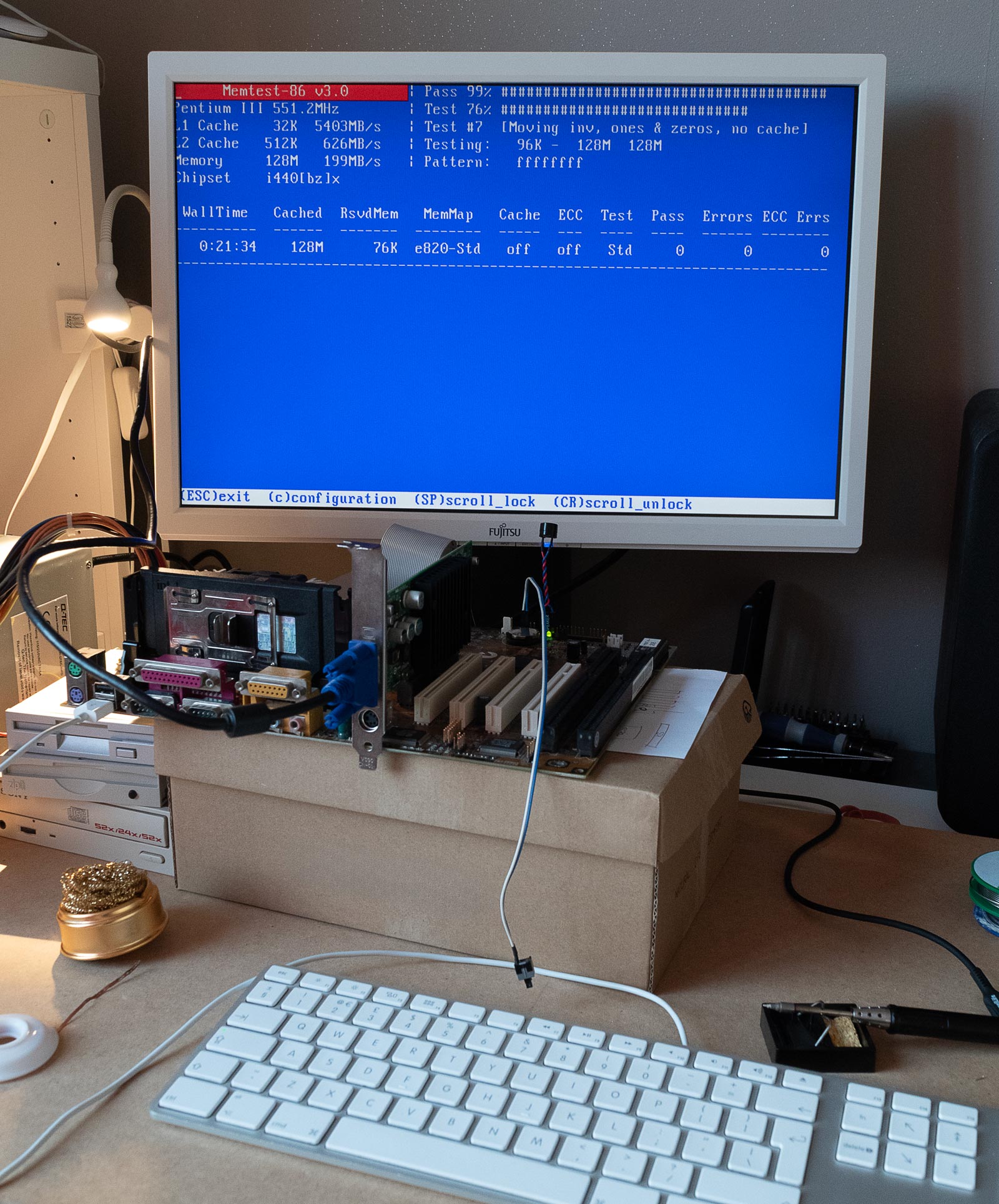 With all suspicious looking capacitors replaced the Elitegroup P6BXT-A+ passed memory tests (here MemTest-86 v3.0) again.
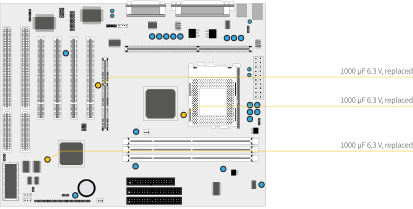 An overview of the mainboard with replaced capacitors highlighted in yellow.
Case
After all core components were deemed functional a case was needed. I wanted it to accommodate three 5.25-inch and two 3.5-inch drives which limited my choice when browsing for old cases suitable for Slot 1/SECC boards. I came across an old damaged Fujitsu T-Bird with internals (original mainboard, Pentium III 500MHz, some RAM and power supply). It was unclear whether it was still operational – which made it more affordable. Hence I bought it. It appeared the computer had been dropped on its top left edge at some point. The plastic front had survived the fall without structural damage but did not fit onto the bent case any more.
With all components and panels removed I focused on streightening the case body: with bar clamps and a hammer the case could be persuaded to mostly align with the front piece again. The panels' latches were bent back in place to properly mate with the slots on the case body. After cleaning all parts and reassembly the case looked much better. The only issue was, that the front not only was yellowed, but that the more I looked at it the less I liked its design. A plan was hatched to manufacture a custom front panel...
A New Face
The new front panel design was inspired by the more edgy industrial appearance of IBM workstations around the beginning of the new millenium, although the usual darker grey was swapped for a smoky white – which brought it closer to the more modern line of computer products sold under the Fujitsu brand. All elements, like drives and buttons, were placed on a black panel on the front's upper area extending approximately two thirds down. This panel also featured a cut-out where the SD-card reader (extender) was integrated into the front. The power button was upgraded to a round black push button with a white LED ring, and both, a small black reset button and a white LED for displaying HDD activity, were also incorporated.
Openings for cables and bottons were cut into the case body, side and top panels were spray painted smoky white, as was the new front panel's base. The inset received two layers of semi-matte black. The three 5.25-inch drives were a tight fit while the rest was easy to assemble. As last touch the screws holding both side panels were replaced by thumb screws. This is a tinkerer's computer after all!
Last Adjustments
The Sound Blaster not only looked great but also worked without further ado. I wired the optical drive's audio into the Sound Blaster's CD-input, so I could stream CD audio over the sound card. I installed two 16 MB SIMM modules on the sound card and thereby prepaired the AWE for SoundFont-related fun. With the addition of a brass standoff attached to a mounting whole at its top end, the card had a point to securely rest on the case's floor and therefore sat perfectly straight in the second ISA socket.
Ready to rumble
SIngle Task
The first operating system to be installed was MS-DOS 6.22. Therefore a 4 GB SD card was partitioned into two 2 GB FAT32 partitions – the first for the system and a second for data. Microsoft Windows 3.1 and several DOS tool – for managing the system and archiving floppy disks – were added: CheckIt and HWinfo provided valuable information about the system's hardware.
Thanks to a customised DOS boot menu memory and driver configurations could be selected to cater the individual needs of different applications or games. Default drivers were replaced with or accompanied by alternatives with lower memory usage and – where possible – loaded into high memory. I settled on HIMEMX, JEMM386, NNANSI, MKEYB and VIDECDD/SHSUCDX. Networking was realised with the packet driver RTSPKT and the amazing mTCP tools. With everything loaded – even a network driver – I ended up with 592K of free conventional memory. In addition a simple ANSI splash screen honoring my first long gone PC, a Tandon XPC 20, was added.
With tools like ImageDisk 1.10 (IMD) and DskImage 1.0 I was able to archive the majority of my 5.25-inch floppy disks which had been stored away since I gave away my last large diskette drive in the early 2000s. Some unfortunately were beyond recovery. Almost all 3.5-inch diskettes were perfectly fine and could be added to my digital archive.
More Advanced Systems
Apparently a quirk of the system is, that boot code must be found within the first 63 blocks of a block device a.k.a. hard drive, which makes booting from other partitions but the first a challenge. This oddity would also cause issues when installing more modern slim linux distros, which would boot their live media and install fine but break the installation within one reboot due to aligning partitions to 2 MB blocks. Antix Linux was the first such linux which was persuaded to accept and respect an old-style boot partition.
For Windows 98SE and Windows 2000 Professional a 128 GB SD card was choosen. It turned out that the most practical way for such a dual-boot setup was to create a shared boot partition plus individiual partitions for each operating system as well as a shared data partition. The Unofficial Windows 98 Second Edition Service Pack is a great way to make your Windows 98 SE experience as smooth as possible. Stability and compatibility are its major goals. I installed version 3.66 – by the time of setting up this PC it was the latest release. Also the Windows 95/98/SE/ME RAM Limitation Patch amd tools like NTFSFree, RawWrite 0.7, CloneCD 2.0.3.2, K95 (C-Kermint 10) and WinSCP 4.3.7 quickly found their way onto the SD card. Windows 2000 got the Unofficiial Service Pack 5.1 (USP 5.1.2195.21) plus tools among which there was iTunes to convert Audio CDs. Surely not save by today's standards, both updated OSes were at least as stable and compatible as possible. For accessing local websites classic Opera 9.64 was added to Windows 98 SE and Windows 2000 received the latest version of Firefox it could officially handle, Firefox 12.
Unix and Linux distos were a must to try out on this vintage hardware. I managed to install Antix Linux and BSD. While Anix was a mostly successful attempt to run up-to-date software on this PC, the latter allowed me to archive unusual diskette formats and is always worth exploring in my opinion.
What's Next?
The most important to-do actually is a Y2K sticker. After all, we clearly proved that this PC reliable works after the 31st of December 1999. What else could be improved on this build? Well, performance (from robustness to speed) always is a topic. This not only applies to hardware itself but also includes software.
Systems and Software
I would also like to learn more about the following operating systems:
- FreeDOS – 1.4 is out!
- IBM OS/2 – I have an inconspicuous and unsuspecting big box OS/2 Warp Connect Version 3 on my shelf
- Suse Linux – A complete pack of version 8.2 install media and books is awaiting to be revisited
Potential CPU Upgrades
The Elitegroup ECS P6BXZ-A+ comes with a Single Edge Contact Cartridge (SECC/SECC2) connector for Pentium II and III processors as well as a Socket 370 ZIF connector (PGA370) for Celeron CPUs. On the SECC connector it offers front side bus speeds of 66 and 100 MHz. Due to technical restraints speeds up to 120 MHz are feasable. Beyond this threshold operation becomes unstable. This limits my choice to the original Katmai and certain Coppermine CPUs.
Matching Intel Pentium III Processors – Katmai and Coppermine
As the fastest frontside bus speed the mainboard supports is 100 MHz all 133 MHz processors are out of the scope, including all Katmai B-variants. The maximum processor speed is 850 MHz because 8.5 is the highest multiplier the ECS mainboard has to offer. With Katmai processors speeds are capped at the 600 MHz mark. With Coppermine processors, however, reaching 850 MHz is possible.
| Speed | Type | FSB | Year | Orig. Price | Price today | Part Numbers | sSpec Numbers |
|---|---|---|---|---|---|---|---|
| 450 MHz | Katmai | 100 MHz | 1999 | USD 496 | EUR 15 | 80525PY450512 | SL364 SL3CC SL38E SL35D SL37C |
| 500 MHz | Katmai | 100 MHz | 1999 | USD 696 | EUR 45 | 80525PY500512 | SL365 SL3CD SL38F SL35E SL37D |
| 550 MHz | Katmai | 100 MHz | 1999 | USD 700 | EUR 35 | 80525PY550512 | SL3F7 SL3FJ |
| 600 MHz | Katmai | 100 MHz | 1999 | USD 669 | 80525PY600512 | SL3JM SL3JT | |
| 650 MHz | Coppermine | 100 MHz | 1999 | USD 669 | EUR 50 | 80526PY650256 | SL3KV SL4CS SL3XK SL3NR SL452 |
| 700 MHz | Coppermine | 100 MHz | 1999 | USD 754 | EUR 75 | 80526PY700256 | SL3SY SL3XM SL454 SL3S9 SL4C3 |
| 750 MHz | Coppermine | 100 MHz | 1999 | USD 803 | 80526PY750256 | SL3V6 SL3WC SL3XP SL4KE SL456 SL4BZ | |
| 800 MHz | Coppermine | 100 MHz | 1999 | USD 851 | EUR 100 | 80526PY800256 | SL3Z6 SL4BY SL3XR SL457 SL4KF |
| 850 MHz | Coppermine | 100 MHz | 2000 | USD 765 | EUR 120 | 80526PY850256 | SL4BW SL43F SL47M SL4KH |
Intel Pentium III processors with more than 550 MHz and a 100 MHz FSB do not show up plentifully for sale. The 850 MHz variant is particularly hard to come by.
Alternatives
The unofficial AwardBIOS 6.00PG includes support for VIA C3/Cyrix III CPUs. To make this work a socket pin modification of Socket 370 or a special FC-PGA slotket would be required on this mainboard revision (1.3x). Modifications may be risky and I do not know which VIA C3/Cyrix III processors could work with the ECS board. Hence I cannot say whether I would gain or loose performance by swapping one in. Unfortunately this BIOS does not allow to disable onboard sound – which would not be ideal as it would have a negative impact on using ISA sound cards.
Resources on the web
- ECS P6BXT-A+ (REV: 1.3x) – theretroweb.com
- Pentium® III Processor Identification and Package Information – archive.org
- List of Intel Pentium III microprocessors – wikipedia.org
- List of Creative Sound Blaster Products – creative.com
- Creative Sound Blaster AWE32 PnP (IDE) – vogonswiki.com
- Diskettenlaufwerke – robotrontechnik.de